Wednesday, December 23, 2015

Slow View Event Database

After upgrading my environment from View 5.3.2 to Horizon View 6.0.1, I started having the following issues once production loads returned to normal:
  • The Event database performance in VMware View 6.0.x is extremely slow when browsing within View
  • High CPU usage on the SQL server, hosting the Event database
  • The larger the Event database becomes, the slower the queries run.
This is discussed in VMware KnowledgeBase article – The Event database performance in VMware View 6.0.x is extremely slow (2094580)
To resolve this issue, you have to create an index.  Run the following command on your SQL Event database:
CREATE INDEX IX_eventid ON dbo.VDIevent_data (eventid)
Substitute VDIevent_data for the table name using your Event database prefix.  In my case it was VDI_event_data so I ran:
CREATE INDEX IX_eventid ON dbo.VDI_event_data (eventid)
So now recent Events load in View Administrator in seconds instead of minutes.

Thursday, November 5, 2015

VSAN 5.5 - Verifying jumbo frames

I've been working on a Virtual SAN 5.5 POC (for various reasons, the environment is still on vSphere 5.5u2) and came across an issue following the guide provided by VMware:

Tips for a Successful Virtual SAN 5.5 Evaluation

It states on page 9 to use vmkping -S 9000 to test connectivity between hosts using jumbo frames.

There is where I hit a wall....  I kept getting the following error message:

~ # vmkping -S 9000 192.168.100.14
*** vmkernel stack not configured ***

I kept racking my brain, checking my configuration, making sure that MTU 9000 was set on the distributed switch and also on the VSAN VMkernel, and that my network switches were set to support jumbo frames on both the physical ports and on my VSAN VLAN (I use VLAN 1001 since VLAN 1000 is my vMotion network).  Then I came across the following post:


Even though that is an old post from well before VSAN existed, it is still entirely relevant.  Now armed with the correct formatting of the command:

~ # vmkping -I vmk2 -s 8972 -d 192.168.100.14
PING 192.168.100.14 (192.168.100.14): 8972 data bytes
8980 bytes from 192.168.100.14: icmp_seq=0 ttl=64 time=0.176 ms
8980 bytes from 192.168.100.14: icmp_seq=1 ttl=64 time=0.159 ms
8980 bytes from 192.168.100.14: icmp_seq=2 ttl=64 time=0.157 ms

--- 192.168.100.14 ping statistics ---
3 packets transmitted, 3 packets received, 0% packet loss
round-trip min/avg/max = 0.157/0.164/0.176 ms

Eureka!  (also vmk2 is my VSAN VMkernel interface and adding "-I vmk2" specifies what interface to force the ping to travel over)


Monday, October 5, 2015

VSAN 5.5 - The case of the missing new disks

I'm setting up a VMware VSAN 5.5 POC (can't upgrade to 6.0 yet for various other reasons) and even though each Dell R730 host had 16 drives, only around 10 of them were showing up in the vSphere Webclient to be claimed as a VSAN disk.

The R730's shipped from Dell with the drives setup in a RAID cluster and even though I had deleted the cluster and changed the controller to pass-thru operation, something must've still been present on some of the drives and the existence of any remnants of data on a drive seems to result in the disk not showing up on the VSAN configuration page:


However the drives were present if I would try to make a traditional datastore out of one of them:


So how to solve this?

You can wipe the disks straight from the ESXi console....

1.) First take note of the naa ID of the disks in question, then console into the host.

2.) Then use the "fdisk" command to do the following:

fdisk /dev/disks/naa.XXXXXXXXXXXXX

where XXXXXXXXXXXXX would be the rest of the naa ID.

3.) Ignore the "fdisk command is depreciated" message.

then you'll be prompted for a command

4.) Type o and press enter.  This command states that you want to create a new empty partition table on the drive, but nothing is actually committed to the drive yet.

5.) Type w and press enter.  This writes the change to the drive.

Here is a screenshot showing the above process:


Repeat this for all the drives in question.  Rescan the disk controller and the drives should appear available to add to VSAN in the vSphere Webclient:


Monday, June 15, 2015

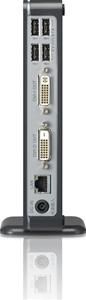
A quick review of the LG CBV42-B zero client


As I mentioned in a previous post, all Tera2 equipped zero clients are essentially the same since they are based around the same Teradici chipset, but there are some slight differences in every OEM manufacturer's units, whether it be in the case design, or availability of ports.  The following are some of my thoughts on the LG CBV42-B zero client:


Significant Pros:
  • VESA mount is included.
  • Has 6 USB ports (2 on the front, 4 on the back) where the norm for zero clients tends to be 4.
  • Somewhat cheaper pricing than most equivalent zero clients (usually less than $250/ea street pricing)

Potential Cons:
  • The only audio out jack is the headphone jack on the front. Makes for slightly messy cable management if you use a monitor with speakers or external amplified speakers and the zero client is on the desk.  However, this isn't really a factor if when I use these in student computer labs where they have to use headphones for audio anyways.
  • The build quality seems to be on the cheaper/lower end.  In the roughly 100 I've purchased, I've had one dud out of the box that wouldn't power up (but replaced quickly by LG under warranty), and I've had to resnap the plastic housing (usually just a corner) on a few where they seem to have not been completely snapped together in production or they might have been jostled too much in shipping.  I haven't had any failures once they were placed into service out in the field though.

Some other thoughts:
  • Doesn't include a USB keyboard and mouse, I buy inexpensive Logitech MK120 kits to go with them.
  • Has a security cable slot towards one edge near the back of the housing.
  • Two DVI ports for monitors, so no need for a DisplayPort adapter if you are hooking up two monitors with DVI connectors.

Not killer features, but still nice touches:
  • LED on power switch is red, not really a functional benefit, but does give it a cool HAL 9000 like glow in a dimly lit or dark room.  :)
  • The headphone and mic jacks are color coded.

Because of it's inexpensive pricing, the CBV42-B is my current preferred zero client for use in classroom computer labs.  When buying in larger quantities, the $20-$75 saved over other manufacturer's Teradici equipped zeros can quickly add up.

Wednesday, May 27, 2015

10ZiG first to offer Tera1 zero client upgrade/buyback program

In a follow up to my previous post, thin and zero client manufacturer 10ZiG is now offering Buyback incentives for all Teradici-based Tera1 zero clients (regardless of brand) towards new 10ZiG Tera2 PCoIP Zero Clients.

More info can be found at the following links:

http://www.pages03.net/10zig/terra1/

http://links.mail3.spopessentials3.com/servlet/MailView?ms=MjI2MDMxMjcS1&r=MTEwODA2NzY2MTIyS0&j=NTYwNTQxMDk1S0&mt=1&rt=0

Thursday, March 26, 2015

More Horizon 6.1 endpoint bad news... now Tera1 zero clients not supported

I stumbled upon this KB today and noticed that Tera1 zero clients will no longer be supported with any Horizon release after 6.0.1.  As someone with a lot of of Tera1 devices that aren't all that old (it's been what, only 2-3 years since Tera1 zeros were being actively sold by vendors?) and still running great, as expected with something as stable as a zero client, I'm even more disappointed to see this than I was by the end of Windows XP and Vista client support (rant is in my previous post).

I could maybe understand it if they've been off the market for 5+ years (since a lot of traditional corporate PC replacement cycles are around 5 years).  VMware must be making some architectural changes with Horizon 6.1 breaking compatibility or something...not expected for a point release (it's not like this is Horizon 7.0 or anything).  I hope Teradici manages a "best effort" approach to keep the Tera1's going for some time even if they can't be "officially" supported.  

To run Horizon 6.1 (we're currently on 5.3 and now planning on going to 6.0.1 this summer) my organization would have to come up with well over $100,000 in funds, not to mention the manpower to do a forklift upgrade, to replace all the thin clients and Tera1 zeros just to be able run 6.1 in a supported setup.  This kind of unexpected expense might just make me rethink keeping my Horizon licensing and production support contracts current going forward and maybe give me reason to give Citrix a call if I now have to replace a lot of hardware.... are you listening VMware?  I haven't administered XenDesktop since the 4.0 days but I'm sure they haven't been sitting still either, and I do note that Citrix specifies "Support for Windows XP ends April 8, 2014 when Microsoft ends extended support for Windows XP. Support for Windows XP Embedded will continue." for Citrix Reciever on its download site.

Monday, March 23, 2015

New Horizon Client 3.3 ends support for Windows XP

I’m sorry to see that starting with version 3.3, the Horizon Client no longer supports Windows XP and support for the older version 3.2 client has only been promised through the remainder of 2015.  I'm sure that a lot of existing customers have older Windows Embedded 2009 (still based on XP) thin clients that run an OS still supported by Microsoft through January 8, 2019.  One of the major reasons to go to Horizon based VDI is to save on endpoint replacement costs and to extend the replacement lifecycle.  Replacing hundreds (or thousands for larger organizations) of these thin clients with ones running newer versions of Windows Embedded or with Teradici based zero clients can be cost prohibative. If a core thin client OS is still supported by Microsoft, as a customer, I would expect VMware to at least provide a client to support it.

Unless VMware has a change of heart, later this year I'll be investigating solutions like Stratodesk, Wyse PC Extender, and Devon VDI Blaster that can essentially replace Windows Embedded (or XP) with a centrally managable version of Linux that runs the Horizon Client.  However I'll have to do some testing to make sure performance is similar and that options like USB flash drive support and location based printing still functions as it does with a thin client running Windows Embedded.  All of these products have a cost, but they are significantly cheaper than purchasing a new thin or zero client if it extends the usable life of them in a Horizon VDI environment for several more years.