After setting up a vSAN cluster I had the following error appear on the ALT-F11 console screen on one of my ESXi 6.0 hosts:
"Unable to restore Resource Pool Settings for hosts/vim/vmvisor/vsanperfsvc it is possible hardware or memory constraints have changed. please verify settings in the vsphere client"
Apparently this is somehow related to DRS. I was able to solve this by switching DRS off and back on again and then rebooting the host that had the error. After booting the host no longer showed that error on the console screen. Hope this helps someone that is having the same issue.
Wednesday, August 16, 2017

Friday, December 16, 2016
VMware's View Storage Accelerator, just use it....
Originally named Content Based Read Cache (CBRC) when it was introduced in vSphere 5 starting in 5.0, VMware's View Storage Accelerator is a read caching solution that is supported in VMware View 5.1 and above that offers improved performance by caching common image blocks in RAM when reading virtual desktop images. All this is completely transparent and can be used with other Storage Array technologies.
CBRC has been a great addition to the VMware architecture and offer's some real benefits to those looking to offload storage requests without additional products or costs. Since the most common blocks are cached in memory and there is no need to request those blocks from the storage infrastructure, there is a reduction in overall storage traffic particularly during boot storms.
The following test data showing the reduction in IOPS and storage bandwidth was posted by VMware on their End User Computing Blog:
However, View Storage Accelerator does have some limitations:
1.) It's a read only caching technology.
The write IOPS still have the same heavy impact as before. If you take away boot storms, write IOs are usually estimated to be between 50-80% of the total IOs during steady state virtual desktop operation.
2.) It's limited to 2GB of RAM per host.
It is a dynamic cache, but in today's age of relatively cheap server DRAM, this is starting to seem a little limited. I'm sure 2GB was determined at one time to be a maximum "sweet spot" for resource usage versus benefits gains. However, since I run primarily linked clone non-persistent desktops in my environment, I wonder how fast a desktop could be if say 16GB of the desktop's main replica image could be cached in RAM.
Thursday, February 4, 2016
VMware preparing "Enabling the Digital Enterprise" announcements on February 9
Preregister for the VMware's February 9 announcements. This is continuing their trend from last year where it's kind of an in-between VMworld's mid-year major product announcements webcast.
From VMware:
Look for two exciting components:
1) Enabling the Digital Enterprise: Deliver and Secure Your Digital Workspace
Pat Gelsinger will be joined by Sanjay Poonen who will present VMware’s digital workspace vision and share exciting announcements that help companies securely deliver and manage any app on any device.
2) Enabling the Digital Enterprise: Build and Manage Your Hybrid Cloud
Raghu Raghuram joins Pat Gelsinger to share how VMware’s software-defined approach can help simplify how you build and manage your hybrid cloud.
Friday, January 15, 2016
Teradici CTO clarifies Tera1 Zero Client support in the future
A while back I received a response from Randy Groves from Teradici to my concern that Tera1 Zero clients were no longer officially supported after Horizon View 6.0.1. It turns out that they will still work as before (at least through View 6.2) with their final 4.7.1 firmware, they just won't be getting any new features that will be added to the Tera2 Zeros. His response follows:
As the Teradici CTO, let me add a little color to this discussion. When support for Network Appliances (e.g. Cisco, F5,...) was added to the protocol (back in View 5.x), this created a new authentication scheme to allow these devices to be an authorized-man-in-the-middle. We did not have the ability to support both the old and the new authentication scheme in the Tera1 devices so they stayed on the "old scheme". Starting with Horizon 6, VMware is only certifying clients that use the new authentication scheme and have not indicated that they will add any new capabilities nor provide support for clients that use the old scheme (which includes older software clients, too).
Because of the large install base of older clients, I do not expect that they will disable the old authentication mode. Since they are not doing any new feature development in that mode, they are also unlikely to break compatibility. However, fixing any issues that might arise for "old mode" clients is not committed by either Teradici or VMware. which is why we have made this End-of-Life announcement.
Tera1s have been on the market for 8 years and we stopped selling new chips to our partners 3 years ago. You will notice in the KB that we are providing "technical guidance" until December 2016 which will give everyone at least 5 years of guidance even if you were one of the last customers to buy a Tera1. Even as CTO, I have several Tera1 devices in my various offices (in fact I am using one right now). I am running pre-released code that is even beyond Horizon 6.1.1. I fully expect that they will continue to work well beyond December 2016. However, if you need new Horizon features or the new capabilities in Tera2 devices, then you will need to upgrade. If you need a guarantee that your Tera1 devices will continue to work on future Horizon releases, then you should also upgrade. Or, you can just keep using them until a Horizon release comes out that breaks compatibility with the old authentication mode - if and when that occurs.
We just want to be clear about the facts so you can make an informed decision.
Randy Groves - Teradici CTO
Wednesday, December 23, 2015
Slow View Event Database
After upgrading my environment from View 5.3.2 to Horizon View 6.0.1, I started having the following issues once production loads returned to normal:
- The Event database performance in VMware View 6.0.x is extremely slow when browsing within View
- High CPU usage on the SQL server, hosting the Event database
- The larger the Event database becomes, the slower the queries run.
This is discussed in VMware KnowledgeBase article – The Event database performance in VMware View 6.0.x is extremely slow (2094580)
To resolve this issue, you have to create an index. Run the following command on your SQL Event database:
CREATE INDEX IX_eventid ON dbo.VDIevent_data (eventid)
Substitute VDIevent_data for the table name using your Event database prefix. In my case it was VDI_event_data so I ran:
CREATE INDEX IX_eventid ON dbo.VDI_event_data (eventid)
So now recent Events load in View Administrator in seconds instead of minutes.
Thursday, November 5, 2015
VSAN 5.5 - Verifying jumbo frames
I've been working on a Virtual SAN 5.5 POC (for various reasons, the environment is still on vSphere 5.5u2) and came across an issue following the guide provided by VMware:
Tips for a Successful Virtual SAN 5.5 Evaluation
It states on page 9 to use vmkping -S 9000 to test connectivity between hosts using jumbo frames.
There is where I hit a wall.... I kept getting the following error message:
~ # vmkping -S 9000 192.168.100.14
*** vmkernel stack not configured ***
Tips for a Successful Virtual SAN 5.5 Evaluation
It states on page 9 to use vmkping -S 9000 to test connectivity between hosts using jumbo frames.
There is where I hit a wall.... I kept getting the following error message:
~ # vmkping -S 9000 192.168.100.14
*** vmkernel stack not configured ***
I kept racking my brain, checking my configuration, making sure that MTU 9000 was set on the distributed switch and also on the VSAN VMkernel, and that my network switches were set to support jumbo frames on both the physical ports and on my VSAN VLAN (I use VLAN 1001 since VLAN 1000 is my vMotion network). Then I came across the following post:
Even though that is an old post from well before VSAN existed, it is still entirely relevant. Now armed with the correct formatting of the command:
~ # vmkping -I vmk2 -s 8972 -d 192.168.100.14
PING 192.168.100.14 (192.168.100.14): 8972 data bytes
8980 bytes from 192.168.100.14: icmp_seq=0 ttl=64 time=0.176 ms
8980 bytes from 192.168.100.14: icmp_seq=1 ttl=64 time=0.159 ms
8980 bytes from 192.168.100.14: icmp_seq=2 ttl=64 time=0.157 ms
--- 192.168.100.14 ping statistics ---
3 packets transmitted, 3 packets received, 0% packet loss
round-trip min/avg/max = 0.157/0.164/0.176 ms
Eureka! (also vmk2 is my VSAN VMkernel interface and adding "-I vmk2" specifies what interface to force the ping to travel over)
Monday, October 5, 2015
VSAN 5.5 - The case of the missing new disks
I'm setting up a VMware VSAN 5.5 POC (can't upgrade to 6.0 yet for various other reasons) and even though each Dell R730 host had 16 drives, only around 10 of them were showing up in the vSphere Webclient to be claimed as a VSAN disk.
The R730's shipped from Dell with the drives setup in a RAID cluster and even though I had deleted the cluster and changed the controller to pass-thru operation, something must've still been present on some of the drives and the existence of any remnants of data on a drive seems to result in the disk not showing up on the VSAN configuration page:

However the drives were present if I would try to make a traditional datastore out of one of them:

So how to solve this?
You can wipe the disks straight from the ESXi console....
1.) First take note of the naa ID of the disks in question, then console into the host.
2.) Then use the "fdisk" command to do the following:
fdisk /dev/disks/naa.XXXXXXXXXXXXX
where XXXXXXXXXXXXX would be the rest of the naa ID.
3.) Ignore the "fdisk command is depreciated" message.
then you'll be prompted for a command
4.) Type o and press enter. This command states that you want to create a new empty partition table on the drive, but nothing is actually committed to the drive yet.
5.) Type w and press enter. This writes the change to the drive.
Here is a screenshot showing the above process:

Repeat this for all the drives in question. Rescan the disk controller and the drives should appear available to add to VSAN in the vSphere Webclient:

Monday, June 15, 2015
A quick review of the LG CBV42-B zero client
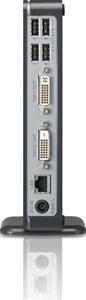

Significant Pros:
- VESA mount is included.
- Has 6 USB ports (2 on the front, 4 on the back) where the norm for zero clients tends to be 4.
- Somewhat cheaper pricing than most equivalent zero clients (usually less than $250/ea street pricing)
Potential Cons:
- The only audio out jack is the headphone jack on the front. Makes for slightly messy cable management if you use a monitor with speakers or external amplified speakers and the zero client is on the desk. However, this isn't really a factor if when I use these in student computer labs where they have to use headphones for audio anyways.
- The build quality seems to be on the cheaper/lower end. In the roughly 100 I've purchased, I've had one dud out of the box that wouldn't power up (but replaced quickly by LG under warranty), and I've had to resnap the plastic housing (usually just a corner) on a few where they seem to have not been completely snapped together in production or they might have been jostled too much in shipping. I haven't had any failures once they were placed into service out in the field though.
Some other thoughts:
- Doesn't include a USB keyboard and mouse, I buy inexpensive Logitech MK120 kits to go with them.
- Has a security cable slot towards one edge near the back of the housing.
- Two DVI ports for monitors, so no need for a DisplayPort adapter if you are hooking up two monitors with DVI connectors.
Not killer features, but still nice touches:
- LED on power switch is red, not really a functional benefit, but does give it a cool HAL 9000 like glow in a dimly lit or dark room. :)
- The headphone and mic jacks are color coded.
Because of it's inexpensive pricing, the CBV42-B is my current preferred zero client for use in classroom computer labs. When buying in larger quantities, the $20-$75 saved over other manufacturer's Teradici equipped zeros can quickly add up.
Wednesday, May 27, 2015
10ZiG first to offer Tera1 zero client upgrade/buyback program
In a follow up to my previous post, thin and zero client manufacturer 10ZiG is now offering
Buyback incentives for all Teradici-based Tera1 zero clients (regardless of brand)
towards new 10ZiG Tera2 PCoIP Zero Clients.
More info can be found at the following links:
http://www.pages03.net/10zig/terra1/
http://links.mail3.spopessentials3.com/servlet/MailView?ms=MjI2MDMxMjcS1&r=MTEwODA2NzY2MTIyS0&j=NTYwNTQxMDk1S0&mt=1&rt=0
More info can be found at the following links:
http://www.pages03.net/10zig/terra1/
http://links.mail3.spopessentials3.com/servlet/MailView?ms=MjI2MDMxMjcS1&r=MTEwODA2NzY2MTIyS0&j=NTYwNTQxMDk1S0&mt=1&rt=0
Thursday, March 26, 2015
More Horizon 6.1 endpoint bad news... now Tera1 zero clients not supported
I stumbled upon this KB today and noticed that Tera1 zero clients will no longer be supported with any Horizon release after 6.0.1. As someone with a lot of of Tera1 devices that aren't all that old (it's been what, only 2-3 years since Tera1 zeros were being actively sold by vendors?) and still running great, as expected with something as stable as a zero client, I'm even more disappointed to see this than I was by the end of Windows XP and Vista client support (rant is in my previous post).
I could maybe understand it if they've been off the market for 5+ years (since a lot of traditional corporate PC replacement cycles are around 5 years). VMware must be making some architectural changes with Horizon 6.1 breaking compatibility or something...not expected for a point release (it's not like this is Horizon 7.0 or anything). I hope Teradici manages a "best effort" approach to keep the Tera1's going for some time even if they can't be "officially" supported.
To run Horizon 6.1 (we're currently on 5.3 and now planning on going to 6.0.1 this summer) my organization would have to come up with well over $100,000 in funds, not to mention the manpower to do a forklift upgrade, to replace all the thin clients and Tera1 zeros just to be able run 6.1 in a supported setup. This kind of unexpected expense might just make me rethink keeping my Horizon licensing and production support contracts current going forward and maybe give me reason to give Citrix a call if I now have to replace a lot of hardware.... are you listening VMware? I haven't administered XenDesktop since the 4.0 days but I'm sure they haven't been sitting still either, and I do note that Citrix specifies "Support for Windows XP ends April 8, 2014 when Microsoft ends extended support for Windows XP. Support for Windows XP Embedded will continue." for Citrix Reciever on its download site.
Monday, March 23, 2015
New Horizon Client 3.3 ends support for Windows XP
I’m sorry to see that starting with version 3.3, the Horizon Client no longer supports Windows XP and support for the older version 3.2 client has only been promised through the remainder of 2015. I'm sure that a lot of existing customers have older Windows Embedded 2009 (still based on XP) thin clients that run an OS still supported by Microsoft through January 8, 2019. One of the major reasons to go to Horizon based VDI is to save on endpoint replacement costs and to extend the replacement lifecycle. Replacing hundreds (or thousands for larger organizations) of these thin clients with ones running newer versions of Windows Embedded or with Teradici based zero clients can be cost prohibative. If a core thin client OS is still supported by Microsoft, as a customer, I would expect VMware to at least provide a client to support it.
Unless VMware has a change of heart, later this year I'll be investigating solutions like Stratodesk, Wyse PC Extender, and Devon VDI Blaster that can essentially replace Windows Embedded (or XP) with a centrally managable version of Linux that runs the Horizon Client. However I'll have to do some testing to make sure performance is similar and that options like USB flash drive support and location based printing still functions as it does with a thin client running Windows Embedded. All of these products have a cost, but they are significantly cheaper than purchasing a new thin or zero client if it extends the usable life of them in a Horizon VDI environment for several more years.
Unless VMware has a change of heart, later this year I'll be investigating solutions like Stratodesk, Wyse PC Extender, and Devon VDI Blaster that can essentially replace Windows Embedded (or XP) with a centrally managable version of Linux that runs the Horizon Client. However I'll have to do some testing to make sure performance is similar and that options like USB flash drive support and location based printing still functions as it does with a thin client running Windows Embedded. All of these products have a cost, but they are significantly cheaper than purchasing a new thin or zero client if it extends the usable life of them in a Horizon VDI environment for several more years.
Wednesday, January 28, 2015
A quick review of the HP t310 zero client
For over two years now, I've exclusively purchased Teradici based zero clients for use in my employer's VMware Horizon View environment because of their ease of management and excellent performance, particularly with full screen video. I've evaluated a lot of demo units, and usually buy by price (since all Tera 2 chipset zeros essentially perform the same) unless one has a specific feature that I'm looking for in an application.
The following are some of my thoughts on the HP t310 zero client:

Significant Pros:
- Audio out jack on the back, headphone jack on the front. Makes for a clean desktop install if you use a monitor with speakers or external amplified speakers.
Potential Cons:
- VESA mount if needed is a pricey extra cost option ($25+).
- Somewhat more expensive than a lot of newer competitors ($359.00 list price....usually around $325 street pricing)
Some other thoughts:
- Could maybe use more rear USB ports. A lot of competitor's products now have 6 USB ports.
- Includes a USB keyboard and mouse, which take up the rear 2 USB ports.
- Has a security cable slot on back of housing.
- Two DVI ports for monitors, so no need for a DisplayPort adapter if you are hooking up two monitors with DVI connectors.
Not killer features, but still nice touches:
- LED on power switch is green when unit is powered on, amber when it's off but still connected to a power source (might be handy to quickly see if the unit's power cord is unplugged).
- Has a separate LED near the power switch that shows if the zero is currently connected to an active session.
- The headphone and mic jacks are color coded.
In a nutshell, the t310 is my preferred zero client for staff use (when I can get them competitively priced) primarily for the "Pro" I listed above. Being able to hook up external speakers via the rear audio jack without taking up the headphone jack on the front just makes for a clean desktop install without anyone having to unplug/plug any wires for headphone use and vice versa. The less my users have to mess with any wires causing potential issues the better in my opinion. A lot of my staff users also prefer dual monitor setups and I personally prefer using 2 DVI jacks (like the t310 has) over finding a second monitor with a DisplayPort input or using an adapter dongle that adds another potential issue area.
The following are some of my thoughts on the HP t310 zero client:
Significant Pros:
- Audio out jack on the back, headphone jack on the front. Makes for a clean desktop install if you use a monitor with speakers or external amplified speakers.
Potential Cons:
- VESA mount if needed is a pricey extra cost option ($25+).
- Somewhat more expensive than a lot of newer competitors ($359.00 list price....usually around $325 street pricing)
Some other thoughts:
- Could maybe use more rear USB ports. A lot of competitor's products now have 6 USB ports.
- Includes a USB keyboard and mouse, which take up the rear 2 USB ports.
- Has a security cable slot on back of housing.
- Two DVI ports for monitors, so no need for a DisplayPort adapter if you are hooking up two monitors with DVI connectors.
Not killer features, but still nice touches:
- LED on power switch is green when unit is powered on, amber when it's off but still connected to a power source (might be handy to quickly see if the unit's power cord is unplugged).
- Has a separate LED near the power switch that shows if the zero is currently connected to an active session.
- The headphone and mic jacks are color coded.
In a nutshell, the t310 is my preferred zero client for staff use (when I can get them competitively priced) primarily for the "Pro" I listed above. Being able to hook up external speakers via the rear audio jack without taking up the headphone jack on the front just makes for a clean desktop install without anyone having to unplug/plug any wires for headphone use and vice versa. The less my users have to mess with any wires causing potential issues the better in my opinion. A lot of my staff users also prefer dual monitor setups and I personally prefer using 2 DVI jacks (like the t310 has) over finding a second monitor with a DisplayPort input or using an adapter dongle that adds another potential issue area.
Thursday, January 15, 2015
Installing the Horizon View 3.2.0 Client on Ubuntu 14.04 LTS 64 bit
It was quite a process to get the new Horizon View 3.2.0 Client working on my Chromebook running Ubuntu 14.04 LTS 64 bit via Crouton.
Previously I had the View Client 2.2.0 installed using the Synaptic Package Manager which was a relatively easy click on the downloaded file (vmware-view-client_2.2.0-0ubuntu0.14.04_i386.deb) and install.
The Horizon View 3.2.0 Linux client is currently only available from VMware in a generic .bundle format package available at: https://download3.vmware.com/software/view/viewclients/CART14Q4/VMware-Horizon-Client-3.2.0-2331566.x86.bundle
Also, the new Linux client is 32-bit only which makes life harder for those running a 64-bit Linux OS. With today's amounts of cheap RAM, who installs 32 bit anymore?? But at least VMware has finally posted an up to date generic client for Linux on their website, so that's progress.
I installed the .bundle package by using the following terminal commands in the directory the package was downloaded to:
sudo chmod +x VMware-Horizon-Client-3.2.0-2331566.x86.bundle
sudo ./VMware-Horizon-Client-3.2.0-2331566.x86.bundle
Note: for me it seems that having the 2.2.0 client installed was a necessary step (it must install some prerequisites) because the 3.2.0 installer wouldn't launch on another one of my 64 bit Ubuntu test machines unless the 2.2.0 client was already installed.
I
checked the options to install everything in the wizard except for Smart Card, and at the end of the installation
you are able to scan for any missing dependencies. Turns out that there is quite a few when you are running 64 bit. Not only would the new client not launch, it broke my previous 2.2.0 client install as well.
So after a lot of trial and error and Googling, I found that the following finally worked:
Run the following commands using root or sudo:
dpkg --add-architecture i386
apt-get update
apt-get install libudev1:i386
apt-get install libtheora0:i386
apt-get install libssl1.0.0:i386
apt-get install libXss1:i386
apt-get install libpulse0:i386
apt-get install libv4l-0:i386
apt-get install libudev1:i386
apt-get install libxml2:i386
apt-get install libXtst6:i386
apt-get install libpcsclite1:i386
apt-get install libuuid1:i386
apt-get install libspeex1:i386
ln -s /lib/i386-linux-gnu/libudev.so.1 /lib/i386-linux-gnu/libudev.so.0
ln -s /lib/i386-linux-gnu/libssl.so.1.0.0 /lib/i386-linux-gnu/libssl.so.1.0.1
ln -s /lib/i386-linux-gnu/libcrypto.so.1.0.0 /lib/i386-linux-gnu/libcrypto.so.1.0.1
After
this, clicking on scan in the installer reported no errors, and I was able to start the Horizon Client by running the command vmware-view
from the command line. After launch, you can then lock the icon to the Launcher for future use.
I did get one error when starting the client, that the ssl lib was old (version 1.0.1f), but according to Ubuntu it is up to date and patched, so I'm not sure why the Horizon Client is looking for version 1.0.0i. You can dismiss the error message and make it so it's not shown again.
I'm not sure that all features work completely even with all the pre-requisites installed. For instance, I'm guessing that USB
redirection doesn't work, because I don't see an option in any of the menus to connect a USB device.
Hopefully this saves someone a lot of head scratching to get the 3.2.0 client installed on Ubuntu, and I wish VMware would have done most of this work
for us by making it available in a .deb package like the 2.2.0 release.
Previously I had the View Client 2.2.0 installed using the Synaptic Package Manager which was a relatively easy click on the downloaded file (vmware-view-client_2.2.0-0ubuntu0.14.04_i386.deb) and install.
Also, the new Linux client is 32-bit only which makes life harder for those running a 64-bit Linux OS. With today's amounts of cheap RAM, who installs 32 bit anymore?? But at least VMware has finally posted an up to date generic client for Linux on their website, so that's progress.
I installed the .bundle package by using the following terminal commands in the directory the package was downloaded to:
sudo ./VMware-Horizon-Client-3.2.0-2331566.x86.bundle
Note: for me it seems that having the 2.2.0 client installed was a necessary step (it must install some prerequisites) because the 3.2.0 installer wouldn't launch on another one of my 64 bit Ubuntu test machines unless the 2.2.0 client was already installed.
So after a lot of trial and error and Googling, I found that the following finally worked:
dpkg --add-architecture i386
apt-get update
apt-get install libudev1:i386
apt-get install libtheora0:i386
apt-get install libssl1.0.0:i386
apt-get install libXss1:i386
apt-get install libpulse0:i386
apt-get install libv4l-0:i386
apt-get install libudev1:i386
apt-get install libxml2:i386
apt-get install libXtst6:i386
apt-get install libpcsclite1:i386
apt-get install libuuid1:i386
apt-get install libspeex1:i386
ln -s /lib/i386-linux-gnu/libudev.so.1 /lib/i386-linux-gnu/libudev.so.0
ln -s /lib/i386-linux-gnu/libssl.so.1.0.0 /lib/i386-linux-gnu/libssl.so.1.0.1
ln -s /lib/i386-linux-gnu/libcrypto.so.1.0.0 /lib/i386-linux-gnu/libcrypto.so.1.0.1
I did get one error when starting the client, that the ssl lib was old (version 1.0.1f), but according to Ubuntu it is up to date and patched, so I'm not sure why the Horizon Client is looking for version 1.0.0i. You can dismiss the error message and make it so it's not shown again.
Wednesday, December 10, 2014
PernixData FVP accelerating View = Happy users
Been doing an evaluation of PernixData FVP with a portion of my users, all I can say is WOW when I look at the latency numbers that the desktops have:

The purple line is the latency of the backend datastore (a FibreChannel SAN) and the blue line is what the desktops experience with Pernix FVP utilizing a local SSD on the host to accelerate the LUN..... pretty much instantaneous response!
The purple line is the latency of the backend datastore (a FibreChannel SAN) and the blue line is what the desktops experience with Pernix FVP utilizing a local SSD on the host to accelerate the LUN..... pretty much instantaneous response!
Tuesday, November 25, 2014
Cleaning up “Already used” desktops in View
The “Already used” error that appears in Problem Desktops in View Administrator is a common problem that occurs with floating (non-persistent) desktops that you have assigned to refresh on log-off. This occurs for various reasons but all leave the desktop in an error state, which requires manual administrator intervention to resolve the issue.
Follow the following KB to permanently resolve the issue:
I set all of my floating pools to "pae-DirtyVMPolicy=2" by default.
Sunday, August 24, 2014
VMworld 2014
Sitting at the airport waiting for my flight to San Francisco. This will be my second VMworld, my first was in 2012. What will we see this year? VVols? A VMware created or endorsed converged appliance architecture (Marvin)?? How is the recent acquisition of CloudVolumes going to change VMware's End User Computing (or is it to early to announce anything)? Plus, how are the third party vendors going to make a splash?
Stay tuned.......
Stay tuned.......
Thursday, July 24, 2014
Why I feel Hybrid SANs aren't necessarily the full solution for VDI storage
In the early days of VDI, storage immediately became a pain point in any virtual desktop implementation using a SAN. Basically the only way to get the IOPS up to an acceptable level was to add more disk spindles, regardless of whether or not more storage space was actually needed. More recently hybrid arrays have become all the rage that use fast SSD caching to cache common reads and often buffer writes before it gets written to the traditional spinning drives. The prices on hybrid arrays are often also extremely competitive with traditional arrays and way cheaper than going all flash....
So simple decision right? Go hybrid and problem solved?
Not so fast..... VDI isn't the same beast as serving databases and web pages.
I have personally seen instances, due to the write "IO blender" effect of hundreds of virtual desktops doing many different things, effectively flood and fill the SSD's of a hybrid array with writes which resulted in the overall performance of the array to fall dramatically and caused latency to increase as the array struggled to flush the SSD cache to spinning disks (so we're back to the original problem) in an effort to free space to cache more writes.
My thoughts on a true solution? Well I think I've found a few.... and which I'll soon post about each separately in the future.
Friday, July 18, 2014
Purging old events from the View Events database
Do you have a lot of non-persistent floating pool desktops that refresh on logoff?
Do you point View Administrator to a SQL Event Database to store historical events?
If so, I've found that the database can get quite big as it seems to basically keeps events forever.
There are VMware KB's for purging the vCenter database of old records, but nothing for View Events.
Then I found the following SQL query on the VMware Community boards:
https://communities.vmware.com/message/1881999
delete from [View-Event].[dbo].[v_event_data_historical] where EventID in (select EventID from [View-Event].[dbo].[v_event_historical] where Time < DATEADD(day,-30,getdate()))
delete from [View-Event].[dbo].[v_event_historical] where Time < DATEADD(day,-30,getdate())
and I changed it to the following for my needs:
delete from [ViewEvents].[dbo].[viewevent_data_historical] where EventID in (where EventID from [ViewEvents].[dbo].[viewevent_historical] where Time < DATEADD(day,-365,getdate()))
delete from [ViewEvents].[dbo].[viewevent_historical] where Time < DATEADD(day,-365,getdate())
Where [ViewEvents] is the name of my Events Database and since I have the table prefix set as "view" in View Administrator, [viewevent_data_historical] and [viewevent_historical] are the names of the tables that need to be purged of old events. If using the above, you'd need to modify those to your table names.
Also note where I changed "-30" to "-365" which is where you specify how old the data has to be to be deleted. I chose 365 days as a safe starting point because 1 year's worth of old Event data is more than I'll ever need, but it's still there if I need to review the past year for some reason.
Even keeping 1 year of data reduced my ViewEvents database size from almost 20GB to ~7GB once I performed a database shrink after running the query. There were at least 2-3 extra years of accumulated old data.
One last thing, if you don't have a lot of disk space and this is the first time running the cleanup, change your logging of the database to Bulk-logging or you'll run out of drive space with all of the transaction logs before it completes.
I also ended up setting up the above query to run as a weekly maintenance cleanup job to keep the Event database size consistent over time.
I also ended up setting up the above query to run as a weekly maintenance cleanup job to keep the Event database size consistent over time.
Wednesday, June 11, 2014
Why I'm moving from blades to traditional rack mount servers for VDI
While
blade servers offer numerous advantages in virtualized environments (such as
easy scalability, minimal cabling, and ease of setup) as VDI has progressed
beyond simple desktop OS virtualization, blades have some significant drawbacks
that leaves them less than ideal for hosting a modern virtual desktop if one
expects near traditional end user computing performance.
I'm currently architecting a second generation VDI deployment that currently resides on HP blades. As the BL685c G6's are approaching five years of age and aren't on the ESXi 5.5 compatibility list, it's time for an update. With modern developments such as Teradici offload cards, nVidia GRiD accelerated graphics, and affordable PCIe SSDs here is why I'm planning on moving the desktops onto newer standard rack mount 2U hosts.
1.) Limited Graphics Capabilities
To
provide the display performance that a typical user is accustomed to,
additional graphics power is necessary.
Most traditional servers include minimal onboard graphics capability and
in order to add extra graphics power, you need a PCI-e slot. While these slots are available in other form
factors, such as tower and rack servers, blade options typically don't include
a lot in the way of advanced graphics capability, and when they do it adds complexity or expense.
The
manufacturer proprietary mezzanine form factor that most blades have for
expansion cards limits the expansion capabilities for the blades because it
typically takes an extended period of time, sometimes years, for a particular
type of card to become available in this form factor (usually either due to the
time it takes a server vendor to certify a card or the time it takes a third
party vendor to redesign the card into this form factor.) Also mezzanine cards are sometimes are not backwards
compatible with previous mezzanine slots.
For instance HP completely redesigned the mezzanine cards in their G8
generation of servers making them completely incompatible with the mezzanine
cards from their older G6 and G7 generations (and vice versa, you cannot use a
G8 card in a G6 or G7 slot). PCI-e is an
industry standard and a newer slot can nearly always utilize cards designed to
an older specification.
3.) Local disk storage options for blades are limited and/or expensive
Wednesday, June 4, 2014
Disabling Startup Repair on your VDI Golden Images
Although the VMware View Optimization Guide is always a good place to start when creating Golden Images for your View deployment, there are a few things that you pick up in real world deployments that come in handy.
Sometimes a virtual desktop shows up under Problem Desktops as “Agent Unreachable” but if you console into that that desktop you may find that Windows 7 just booted into startup repair mode. You can easily disable this from happening. Log into the Golden Image and open a command prompt as an Administrator and type in the following:
bcdedit /set {default} bootstatuspolicy ignoreshutdownfailures
This should stop Windows 7 from ever launching startup repair after a shutdown failure. You could also swap out ignoreshutdownfailures with ignoreallfailures if you wanted it to also ignore boot failures.
Subscribe to:
Posts (Atom)